
Key concepts
Business terms
This documentation was created by developers and is meant for developers to use the API. As a developer we know that some of the business terms may not be clear. So we will attempt to clear up some of these.
A good place to start is our main websites
Products
Our main products are surveys. There are typically two types of survey: RICS Home Survey – Level 2 (with or without a valuation) or a RICS Home Survey – Level 3. We also offer valuations (e.g. RICS Help to Buy valuation) and specialist reports (e.g. Structural Engineer report). Associated with some products are attributes (see below).
Introducer
An introducer to The Moving Portal is an organisation who pushes or introduces business to us. They are typically Mortgage Brokers, Financial Advisors, Estate Agents, Solicitors, but may also be a firm who provide a range of property services e.g. conveyancing, mortgages. The Introducer can receive a referral fee for business pushed to us.
Supplier
A supplier to The Moving Portal is an organisation who supplies us what our customers have bought - typically a survey or valuation. This is likely to be a Surveying firm, but may also be a firm who can find a surveyor, e.g. for specialist surveys.
Customers
Most of our customers are people who are looking for surveys or valuations, usually for the purpose of moving house. Although, some of our customers may also be looking for a specialist survey (e.g. Structural Engineers report).
Sometimes the customer could be an Introducer who is paying for the survey, e.g. a lender. This is known in the API as the Primary Customer and the customers listed will be the clients of the primary customer.
Panel
We work with a set of surveyor firms (our suppliers) known as a panel. All surveyors on The Moving Portal’s panel are RICS accredited. We operate as a panel manager to offer a comprehensive service that will protect our customers interests and ensure that everything is managed smoothly.
Quote
Our system can produce a quote for a product which can provide one or more results. This can be manipulated by the introducer (e.g. change the referral fee). We typically do not chase quotes generated by an introducer.
Referral
An Introducer can instruct a quote which in most cases will be known as a referral to us. Our team will contact the customer to convert the referral into an order. As well as referring a quote to us, using the API an introducer can send a direct referral to us.
Order
An order is an instruction which has been paid for and we can then proceed with assigning it to a conveyancer on our panel.
Instruction and Case
An instruction is a general term and includes Referrals and Orders. It is when an introducer instructs us to do something with the quote or referral they have sent us e.g. to convert a referral into an order and then to assign a surveyor and manage the process until completion. An introducer cannot make changes once they have instructed us. We use the terms Instruction and Case interchangeably throughout our API.
Introduction
We act as a panel manager for suppliers of surveys. These could be surveyor firms or other panel managers who provide similar functionality for specialist requirements. As a panel manager we provide a single service to interact with our nationwide network of suppliers of surveys.
The Moving Portal is a B2B system where we receive instructions for surveys from Introducers, e.g. mortgage brokers, estate agents, lenders, financial advisors or from other organisations representing these users. The introducers act on behalf of their customers (i.e. the people who want a survey). We can also receive instructions directly from customers.
These introducers may have went through a quoting process before sending a referral or can send direct referrals to us. Our team will then try to convert the referred instruction into an ordered instruction after payment has been received from the customer.
I My Home is a B2C system where we allow customers to create quotes, allowing those quotes to be referred to us as an Instruction.
On both systems, when we have an instruction that has been ordered (checked and paid for) we send it to a Supplier. The supplier will then book an appointment with the access provider (the estate agent or vendor selling the property). After the appointment has taken place, the supplier should confirm the appointment took place and then upload a report.
This API provides functionality to both Introducers and Suppliers to take them through this journey.
Customers can usually logon to both portals to allow them to make an online payment for their case and track the progress as well as receive emails and SMS messages.
Some customers configured to not be able to logon
It is possible for Introducers to be configured so that their customers do not logon to our portal. This is usually where the Introducer is the actual customer (i.e. normally a lender).
A simplified view of the journey taken by a quote/referral for an Introducer and an instruction for Supplier is described below.
Other actions
At most points through the process it is possible for other actions to take place, e.g. an instruction can be
- Cancelled,
- Put on Hold (and subsequently Taken off Hold)
- Product is changed
- Notes are added
- Case is reallocated
- Cancelled cases can also be Uncancelled
- Completed cases can be reopened (although our policy is to try not to do this).
These are not shown in these simplified descriptions and diagrams.
Introducer journey
There are a few ways of getting a referral to us.
- The first approach is to use the Quote service to create a quote. The quote will contain one or more results, from which you can choose one and refer that to us.
- The second approach is using the Referral service and allows an introducer to create a direct referral.
Quotes
An introducer can create a quote by specifying some details
- Product (or possibly a list of products in the future).
- Property details - primarily the Property value/Purchase price or the banding.
- At least one customer.
From this information we will generate a quote with a single result which will be in the SAVED state.
Multiple quote results
The quoting structure allows for multiple results to be returned, but this is currently not used. In future, we may generate other results - e.g. if you requested a Level 2 survey, we may also generate a Level 2 survey with valuation and a Level 3 survey.
Unable to generate a quote
It is possible that we cannot generate any results for the quote, e.g. for some specialist reports. In which case the Price on Application flag will be set.
You will have some options with the generated quote:
- Request - if the quote has the price on application flag set it should be in the REQUESTED state.
- Edit the property details - change details of the property.
- Edit the customer details - you need to specify the customer details when you quote, but the customer can be modified and other customers added (or removed).
- Email it to the customer - initially the quote is only visible to you, but you can allow the customer access to it. Once this is done you should probably not increase the fee!
- Adjust fee - you can change your fee, which will modify the total fee.
- Refer - send the quote to us as a referral which will set the quote to be in the REFERRED state.
- Remove - remove the quote, i.e. it is no longer required and the quote will be in the REMOVED state.
- Assign - set the owner of the quote (the person at your firm that is reposible) - see below.
- References - is is possible for the introducer to update their references for the quote.
A quote also has an expiry date - after which it will be in the EXPIRED state.
Following up quotes
At TMP we do not normally follow up quotes generated by introducers in order to convert them into orders. The only circumstance that we do this is when the customer has generated the quote themselves for which there are a few mechanisms. Please discuss with your account manager.
Referrals
The journey for the introducer to get a referral to an instruction can start in two ways:
- From a quote (via the Quote service).
- From a direct referral (via the Referral service).
A direct referral will normally be put into a state NEW where it will be reviewed to see if The Moving Portal can accept it.
A quote will usually go straight through to the REFERRED state. It should already have been checked as the quoting mechanism will prevent fees that are invalid. However, checks can also be done which may push some quotes through to the NEW state.
The main review items will be checking of the fee, since the introducer has provided the fee themselves.
Other checks will need to be done on coverage and suitability. These checks can be done at any stage including after allocation to a surveyor where further issues may be identified.
Once a referral has been received the steps below will be taken by TMP and the supplier:
- Payment will be taken - at this point the instruction can be considered as ORDERED.
- It will be assigned to a supplier putting the instruction in the ALLOCATED state. The supplier would then issue their Terms and Conditions to the customers which will add some additional information to the instruction (it will not change the status).
- The supplier will then BOOKAPPOINTMENT. They can also REBOOKAPPOINTMENT.
- The supplier can UPLOADREPORT (which will complete the case).
- It may be possible to REPLACEREPORT once a case has been completed.
- In some scenarios it is possible to COMPLETE the case without uploading.
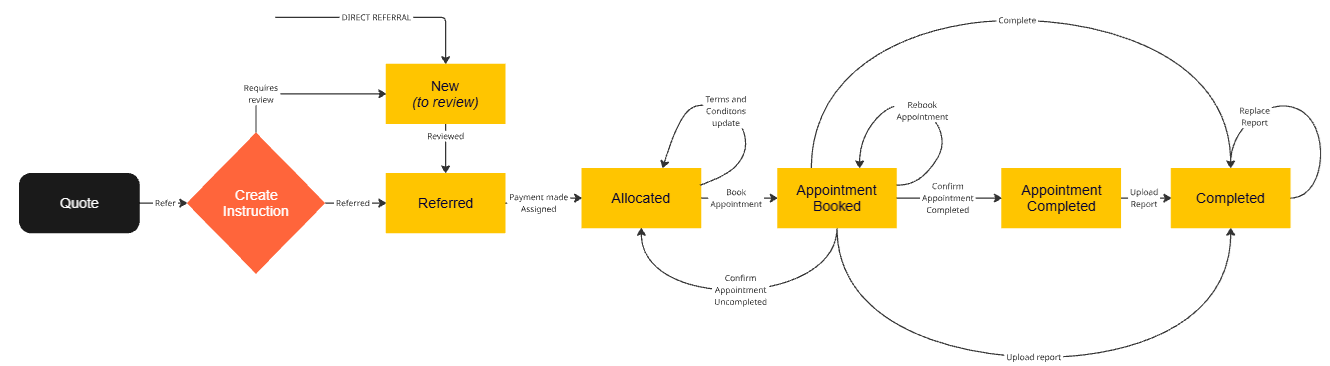
Confirm appointment functionality not enabled
Introducer interaction with an instruction
The introducer cannot manipulate an instruction - an instruction is where
- a quote has been referred or
- a direct referral has been made.
The introducer will continue to receive emails about the continuing journey of the instruction and they can track the instruction in the portal. The customer will usually receive credentials to logon and track the journey as well (although some instructions can be created without the end customer being involved).
The introducer can however logon to the interactive portal and make a card payment themselves (from their own account). This is normally done by the customer. Card payment functionality is NOT AVAILABLE via the API.
Both the introducer and customer can add notes to the case.
Supplier journey
The journey for the supplier starts with an ordered instruction. An instruction for a supplier works through the following stages (with OPERATIONS performed by the supplier in bold):
- Case is ASSIGNED to a supplier (by TMP), who can then ACCEPT or DECLINE the case.
- Whilst at the ACCEPTED status it is possible for the supplier to update the status of the Terms and Conditions (i.e. sent and/or received). This will add some additional information to the instruction (it will not change the status).
- If the supplier accepts they will then BOOKAPPOINTMENT, which they can then REBOOKAPPOINTMENT.
- After the appointment the supplier can UPLOADREPORT (which will complete the case).
- It may be possible to REPLACEREPORT once a case has been completed.
- In some scenarios it is possible to COMPLETE the case without uploading.
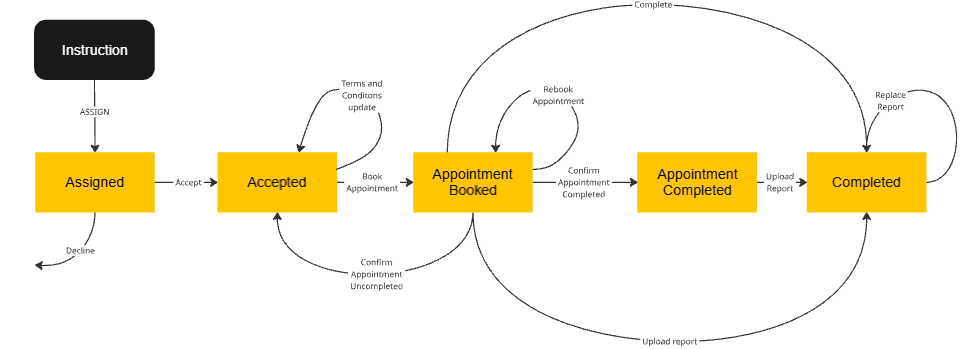
Confirm appointment functionality not enabled
Quote references
When a quote is created a unique reference will be created to identify it.
Instruction references
Internally our Instructions can have multiple cases. When you retrieve an Instruction you will find a CaseIndex property - this will usually be set to the value 1.
When you request or operate on an instruction it will return or process a single case.
Multiple case functionality is not yet in use.
Instructions have references used to identify them. We will provide our reference (the TMP reference) for it. If a quote has been referred it will have the same reference as the quote.
An introducer can also provide a reference when a quote is referred or a direct referral created.
A supplier can also provide a reference for a case allocated to them.
TMP references
For our reference
- The TMPReference: usually in the format TMP123456 or IMH456789, you may also get a reference with a suffix -2 or -4 (e.g. TMP123456-2). This suffix represents the index of the case. This reference is unique. You should use this reference to retrieve or operate on a case.
- The TMPCustomerReference: the value displayed to users (in our portal) to navigate to the instruction. This reference will be used in all emails. It will usually be the same as the TMPReference, with the TMPReference having a suffix when there is more than one case associated with it.
Introducer references
For the introducer, there are two references. These are only usable by the Introducer who created them.
- IntroducerIntegrationReference: if provided, is used for integration and allows the introducer to retrieve a case using this reference (rather than our reference). It must be unique over all quotes and instructions. A typical use is an internal id for the instruction. It is displayed in our portal - but only to TMP users.
- IntroducerCustomerReference: if provided, this is the reference that is displayed to the customer (in our portal). The Customer reference is usually the same as the Integration reference. It must be also unique over all quotes and instructions.
Either IntroducerIntegrationReference or IntroducerCustomerReference can be used by an introducer to retrieve a quote or an instruction. The value of IntroducerIntegrationReference will take precendence.
The references should be unique over both quotes and instructions. There is a method on the referral service which can be used to check if a reference is already in use.
When a quote is instructed any introducer reference will be placed on the instruction. The introducer reference on the quote will be removed.
Make references clear
You should either
- make both Introducer references (IntroducerIntegrationReference and IntroducerCustomerReference) the same value, OR
- ensure that the values do not conflict
Supplier references
For the supplier, there are two references. These are only usable by the Supplier who created them.
- SupplierIntegrationReference: if provided, is used for integration and allows the supplier to retrieve a case using this reference (rather than our reference). It must be unique for each instruction. A typical use is an internal id for the instruction. It is displayed in our portal - but only to TMP users.
- SupplierCustomerReference: if provided, this is the reference that is displayed to the customer (in our portal). The Customer reference is usually the same as the Integration reference. It must be also unique for each instruction.
Either SupplierIntegrationReference or SupplierCustomerReference can be used by an introducer to retrieve an instruction. The value of SupplierIntegrationReference will take precendence.
Make references clear
You should either
- make both Supplier references (SupplierIntegrationReference and SupplierCustomerReference) the same value, OR
- ensure that the values do not conflict
Introducer referrer and owner
Introducer owner
When a quote or direct referral is created it will normally be assigned an owner. The owner is an interactive user at the introducer, e.g. an employee working as a broker. It is then possibly to modify the owner.
This is typically used for Introducers where their brokers are employees and you use our system to track commissions. Our advice is to use the Integration Service Account if you do not require this functionality.
Introducer referrer
When a quote or direct referral is created it is possibly to tell us who your referrer is. This is where an introducer can send cases to us on behalf of another firm.
This typically is for introducers who provide other products, e.g. conveyancing, property searches, removals etc and work with their own set of introducers. These introducers have their own customers. You should review GDPR for more details about the impact of this.
You will tell us the name of the referrer as optionally a contact at the referrer. The name of the firm will be shown to the customer on the quote/instruction rather than your firm name.
Milestones
Milestones represent key stages in the process. Associated with each milestone is
- Has the milestone been completed - and when it was completed.
- Who created the milestone (the firm name and sometimes the person at the firm).
- Data for the milestone (see Milestones).
For Introducers they are:
- ALLOCATED - When a supplier agrees to take on the work required.
- APPOINTMENT - Details of the appointment.
- COMPLETED - When a case completes. Is mutually exclusive with CANCELLED.
- CANCELLED - When a case is cancelled. Is mutually exclusive with COMPLETED.
For Suppliers they are:
- ASSIGNED - When a case is assigned to a supplier.
- ACCEPTED - When a case is accepted by a supplier.
- APPOINTMENT - Details of the appointment.
- COMPLETED - When a case completes.
Suppliers cannot access Cancelled cases
There is no CANCELLED milestone for suppliers. When a case is cancelled the supplier no longer has access to it. A case can also be reassigned to another supplier - when this happens the supplier will no longer have access to it.
Reasons
Some methods require a reason why an operation took place, e.g. for a supplier to rebook an appointment.
You can use the Data service to retrieve the data that is applicable to an operation. In most methods where a reason can be specified it is also for a reason not covered by the codes to be specified (in free text) - this is known as the "OtherReason". We do not share the free text provided (as it may contain information that cannot be shared, e.g. personal information).
For example, a reason for rebooking the appointment is that VENDORREQUEST (with description Vendor request) and if chosen the we can let the customer know this, which should reduce support calls to yourself and others.
It is hoped that the reasons provided are sufficient to determine why an action has been taken. When specifying a reason we request that if a reason code is valid that it is used and not to specify other in order to provide further information. If you want to provide further information then please add a note to the case instead.
The reasons specified are regularly correlated and will be used to try and provide a better service.
Primary customer
For some instructions the customers listed are not the customer who has initiated the instruction. In these cases we have a primary customer who is the actual customer. The customers listed are the clients of the primary customer.
Typically, this is where a Lender has initiated a survey and the customers listed are the clients of that lender (e.g. fixed fee remortgage).
The property PrimaryCustomer in the Instruction will have details of who the Primary customer is. Suppliers should send Terms and Conditions of engagement to the primary customer when there is one. The CorrespondenceAddress property will be set to the address of the primary customer.
In most of these cases where we have a primary customer the end customers will not have access to the online instruction - the property in the Instruction IsVisibleToCustomers will be set to false.
Is visible to customers
The flag IsVisibleToCustomers is normally switched off where there is a primary customer. However, this flag may be switched off for other Instructions that don't have a primary customer explicitly set. This flag is not exclusive to Primary customers.
For example when we review a referral made directly to us rather than via our Quoting system. In this case we check the instruction for reasons that we cannot accept it (e.g. fee, coverage, conditions). This flag can also change to allow an instruction to be visible, e.g. after a referral has been checked.
On hold
A case can be marked as being On hold. When a case is marked as thus it does not prevent the case from progressing. This is simply an indication that this has requested or the case is not progressing.
We have decided to allow operations to continue (particularly to support integration) as operations may still take place without getting TMP involved.
Only TMP can put a case on hold or take it off hold.
Read only
A case can be marked by TMP as being Read only. This is generally used for historical cases.
No updates can be made to a read only case.
When a case is read only the otherInformation property returned for an Instruction and Instruction search will have a property READONLY set to true.
Configuration
It is possible to configure Introducers and Suppliers based on our requirements, their requirements, what the product requires and also our customers needs. This configuration is used throughout the services to determine functionality - primarily in validation, but also in what data is returned.
Below is a summary of the configuration at the Supplier and Introducer level - but this may be overridden at the product level.
Supplier configuration
| Description | Default value |
|---|---|
| AppointmentToBeBooked Whether an appointment needs to be booked. | Yes |
| CollectAppointmentTime Whether the timeslot for the appointment (i.e. morning, afternoon) should be collected. | Yes |
| ConfirmTermAndConditionsOnBookingAppointment Terms and condititions must be confirmed as agreed on booking appointment. | Yes |
| AllowOptionForReportToBeEmailedToCustomer Whether the option for a report to be emailed to the customer is valid. | Yes |
| RequireReportEvenIfEmailedToCustomer Whilst a report can be emailed to the customer does it still needs to be uploaded. | Yes |
Introducer configuration
| Description | Default value |
|---|---|
| CanViewReport Whether the report can be downloaded on completion. | Yes |
Codes and Data sets
Data sets can be retrieved using the Data service.
Examples are reasons for taking an action, timeslot codes.
The data returned may change. They do not change often, thus you may only want to update them on a regular interval, but not in conjunction with every call. Or for example, when you retrieve an instruction if a code is returned which you do not recognise you can then retrieve the data for that data set.
In addition to the data service there are codes that are used throughout the system. These are listed below. Some of these are available with the Data service.
Product codes
Use the Data Service with a setCode value as below to retrieve a list of products:
- ALLPRODUCTS to get a list of all products.
- ACTIVEPRODUCTS to get a list of active products.
- MYPRODUCTS to get a list of your products.
The list of products available via the API may be different from those via the portal or the list below. The current list of products (as of February 2025) that can be used via the API are:
| Product Code | Product Name | Active |
|---|---|---|
| ASBESTOSREPORT | Asbestos Report | Yes |
| DRAINREPORT | CCTV Drain Report | Yes |
| DAMPTIMBERREPORT | Damp & Timber Report | Yes |
| ELECTRICALREPORT | Electrical Report | Yes |
| GASCENTRALHEATINGREPORT | Gas Report | Yes |
| HOMESERVICESREPORT | Home Services Report | Yes |
| JAPANESEKNOTWEEDREPORT | Japanese Knotweed Report | Yes |
| LEASEEXTENSIONVALUATION | Lease Extension Valuation | Yes |
| RICSHTBVALUATION | RICS Help to Buy Valuation | Yes |
| RICSL2SURVEYVALUATION | RICS Home Survey - Level 2 (Survey & Valuation) | Yes |
| RICSL2SURVEY | RICS Home Survey - Level 2 (Survey only) | Yes |
| RICSL3BUILDINGSURVEY | RICS Home Survey - Level 3 (Building Survey) | Yes |
| RICSINDEPENDENTVALUATION | RICS Independent Valuation | Yes |
| ROOFREPORT | Roof Report | Yes |
| STRUCTURALENGINEERSREPORT | Structural Engineers Report | Yes |
| TREEREPORT | Tree Report | Yes |
| WALLTIEREPORT | Wall Tie Report | Yes |
Latest products can be retrieved via the Data Service.
Attribute codes
We can apply an attribute to a case. This normally represents a feature of the product.
The current list of products (as of February 2025) that can be used via the API are:
| Attribute Code | Description |
|---|---|
| HTBVALUATIONREWRITE | Represents a Desktop valuation performed on a HTB Valuation. Contact TMP if you feel that this is required. It is only available under specific circumstances and the costs are different. |
| RICSL3BUILDINGSURVEY | Represents a valuation added to a L3 survey. It is not normally part of a L3 survey but can be added if required. Contact TMP to add this. There will normally be an additional fee. |
Latest attributes can be retrieved via the Data Service.
Property value tiers
These specify the tiers for the value of a property. They are used in creation of the details about the property and are part of the pricing calculation. This data is typically used in a dropdown or can be calculated from the purchase price/property value.
The Data service can be used to return this with the key DEFAULT-PROPERTYVALUETIERS.
| Code | Description |
|---|---|
| TO50K | £0 to £50,000 |
| 50KTO100K | to £100,000 |
| 100KTO150K | to £150,000 |
| 150KTO200K | to £200,000 |
| 200KTO250K | to £250,000 |
| 250KTO300K | to £300,000 |
| 300KTO350K | to £350,000 |
| 350KTO400K | to £400,000 |
| 400KTO450K | to £450,000 |
| 450KTO500K | to £500,000 |
| 500KTO550K | to £550,000 |
| 550KTO600K | to £600,000 |
| 600KTO650K | to £650,000 |
| 650KTO700K | to £700,000 |
| 700KTO750K | to £750,000 |
| 750KTO800K | to £800,000 |
| 800KTO850K | to £850,000 |
| 850KTO900K | to £900,000 |
| 900KTO950K | to £950,000 |
| 950KTO1000 | to £1,000,000 |
| 1000KTO1500K | to £1,500,000 |
| 1500KTO2000K | to £2,000,000 |
| 2000KTO2500K | to £2,500,000 |
| 2500KTO3000K | to £3,000,000 |
| 3000KTO3500K | to £3,500,000 |
| 3500KTO4000K | to £4,000,000 |
| 4000KTO4500K | to £4,500,000 |
| 4500KTO5000K | to £5,000,000 |
| OVER5000K | over £5,000,000 |
Property ages
These specify tiers for the age of a property. They are used to inform the supplier but can also be used to determine suitability of a product, e.g. if over 100 years old then a Level 2 survey may not be sufficient. This data is typically used in a dropdown or can be calculated from the year the house was built.
The Data service can be used to return this with the key DEFAULT-PROPERTYAGES.
| Code | Description |
|---|---|
| LESSTHANTENYEARS | Less than 10 years |
| TENTOFIFTYYEARS | 10 to 50 years |
| FIFTYTOHUNDREDYEARS | 50 to 100 years |
| MORETHANONEHUNDREDYEARS | More than 100 years |
Property types
These specify the type of property. They are used to inform the supplier. This data is typically used in a dropdown or can be calculated from the year the house was built.
The Data service can be used to return this with the key DEFAULT-PROPERTYTYPES.
| Code | Description |
|---|---|
| DETACHED | Detached |
| TERRACED | Terraced |
| FLAT | Flat |
| SEMI | Semi-detached |